



The Phantom Blade Zero system requirements reveal what your PC needs to run this highly anticipated action game. The minimum specifications call for an Intel Core i7-8700K or AMD Ryzen 5 3600 processor, 16GB of RAM, and an NVIDIA GeForce GTX 1660 6GB or AMD Radeon RX 5500 XT 8GB graphics card. You also need a 64-bit version of Windows 10 or Windows 11, DirectX 12, and an SSD. These minimum specifications target 1080p gameplay at 30 FPS with upscaling enabled.
For a smoother experience, the recommended specifications include an Intel Core i5-10600K or AMD Ryzen 5 5600X processor and an NVIDIA GeForce RTX 3060 Ti or AMD Radeon RX 6700 XT. This configuration targets 1440p at 60 FPS with upscaling enabled.
Knowing these requirements can help you decide whether your gaming PC is ready. It can also help you identify which components might need an upgrade before you enter the game’s dark martial arts world.
Phantom Blade Zero Minimum System Requirements
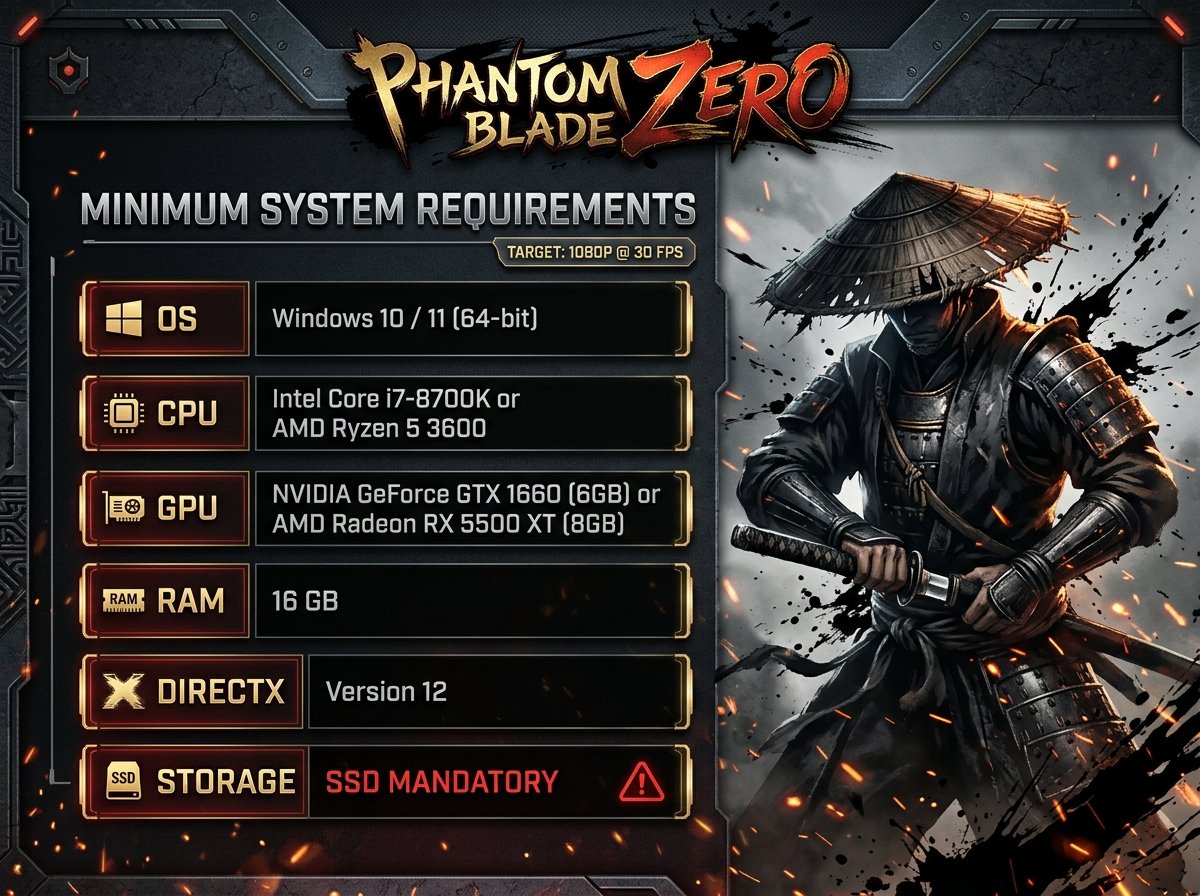
The minimum Phantom Blade Zero PC requirements are designed for players who want to experience the game at 1080p with a target of 30 FPS. However, meeting these specifications does not guarantee identical performance on every computer.
Processor Requirements
Your PC needs an Intel Core i7-8700K or AMD Ryzen 5 3600 processor at minimum. Both are desktop CPUs capable of handling demanding games, although performance also depends on your graphics card, memory and overall system configuration.
If your computer uses an older processor, check its performance before deciding to upgrade. A processor below the listed specification may struggle to deliver consistent frame rates during demanding combat sequences.
Graphics Card Requirements
The minimum graphics cards are the NVIDIA GeForce GTX 1660 with 6GB of VRAM and AMD Radeon RX 5500 XT with 8GB of VRAM. Either model meets the game’s published minimum GPU requirement.
These specifications provide a useful starting point for players with older gaming PCs. However, you should not assume that every graphics card with similar memory capacity will offer equivalent performance.
The GPU must also support the game’s required graphics features. Therefore, check your exact graphics card model rather than relying only on its VRAM capacity.
RAM and Operating System
Phantom Blade Zero requires 16GB of RAM. This is the listed minimum and recommended memory capacity, so players should ensure their computers have enough available memory for the game and background applications.
The operating system requirement is Windows 10 or Windows 11, using a 64-bit installation. The game also requires DirectX 12.
An SSD is mandatory. A traditional hard drive does not meet the stated storage requirement, so players should plan to install the game on a compatible solid-state drive.
Phantom Blade Zero Recommended System Requirements
If you want a smoother experience, the recommended configuration is a better target than the minimum specification. The developer lists 1440p resolution at 60 FPS with upscaling enabled as the recommended performance target.
Recommended Processor and Graphics Card
The recommended processors are the Intel Core i5-10600K and AMD Ryzen 5 5600X. These CPUs provide the intended processor class for the game’s recommended PC configuration.
For graphics, the developer specifies the NVIDIA GeForce RTX 3060 Ti with 8GB of VRAM or the AMD Radeon RX 6700 XT with 12GB of VRAM.
This hardware combination targets a higher resolution and frame rate than the minimum configuration. Nevertheless, actual results can vary with graphics settings, game updates, drivers and the complexity of each scene.
Is 16GB RAM Enough?
Yes, 16GB of RAM meets both the published minimum and recommended requirements. You do not need 32GB simply to satisfy the official specification.
However, your computer may benefit from additional memory if you regularly run several demanding applications alongside the game. Closing unnecessary background programmes can also help free up system resources.
Remember that RAM is only one part of gaming performance. A powerful graphics card cannot automatically compensate for every processor or storage limitation.
Phantom Blade Zero Storage Requirements
Storage deserves particular attention because Phantom Blade Zero requires an SSD and has a substantial installation footprint.
The game is expected to occupy approximately 145GB of storage. However, the launch preparation instructions also advise PC players to reserve at least 300GB of free disk space for the preloading process.
These figures describe different storage considerations. The game’s approximate installed size is not the same as the temporary free-space allowance recommended for preloading.
If your SSD has limited capacity, check the available space before starting the download. Leaving additional room for temporary files and future updates can also help prevent installation problems.
A compatible NVMe SSD may offer excellent performance, but the published requirement specifically states that an SSD is necessary. It does not establish that every player must purchase an NVMe model.
Ray Tracing and Path Tracing Requirements
Phantom Blade Zero also has separate hardware recommendations for more demanding graphics features. These configurations are different from the standard minimum and recommended specifications.
Ray Tracing
For ray tracing, the published recommendation identifies the NVIDIA GeForce RTX 5060 with 8GB of VRAM. The stated target is 1080p at 60 FPS with upscaling enabled.
Ray tracing can improve the appearance of lighting and reflections in supported scenes. However, these effects require additional graphics processing, so performance depends on the hardware and selected settings.
Players who prioritise smooth gameplay over advanced lighting can consider the standard recommended configuration instead.
Path Tracing
Path tracing has a substantially higher graphics requirement. The published recommendation identifies the NVIDIA GeForce RTX 5080 with 16GB of VRAM for a target of 2160p at 60 FPS with upscaling enabled.
This target corresponds to 4K output. Path tracing can demand considerably more processing power than conventional rendering techniques.
Consequently, a PC that meets the standard recommended requirements should not automatically be considered suitable for the path-tracing target. Choose your hardware according to the visual settings and resolution you want to use.
Can Your PC Run Phantom Blade Zero?
Whether your PC can run Phantom Blade Zero depends on how closely its components match the published requirements.
A computer with a Ryzen 5 3600, 16GB RAM and Radeon RX 5500 XT 8GB meets the listed minimum hardware specification, provided the remaining requirements are also satisfied. Its stated target is 1080p at 30 FPS with upscaling.
By contrast, a computer with a Ryzen 5 5600X, 16GB RAM and Radeon RX 6700 XT matches the recommended CPU and GPU options. This configuration targets 1440p at 60 FPS with upscaling enabled.
These examples describe the published hardware targets rather than guaranteed results. Your actual frame rate may differ depending on the final game build, graphics settings, drivers and other system components.
What If Your PC Falls Below the Minimum?
If your graphics card or processor is older than the listed minimum, check whether upgrading one component would bring your computer closer to the required configuration.
Start by identifying your exact CPU, GPU, RAM capacity and available SSD space. Windows’ Task Manager can show your processor, memory and graphics hardware, while its Performance tab provides a convenient overview of system resources.
Do not purchase new hardware based solely on a product’s name or memory capacity. Compare the exact model against the requirements and consider the performance of your existing components before spending money.
How to Prepare Your PC Before Playing
Preparing your computer can help you avoid common installation and performance problems. First, confirm that Windows is running a supported 64-bit version and that your graphics hardware supports DirectX 12.
Next, ensure that the SSD has sufficient free space. Because the preloading guidance recommends 300GB of available space, planning ahead is especially important if your drive also contains several large games.
You should also install the latest suitable graphics drivers. Updated drivers can improve compatibility, although they cannot guarantee a particular frame rate.
Finally, close unnecessary background applications before launching the game. Once you start playing, adjust graphics settings gradually and monitor performance rather than assuming that one preset will suit every PC.
What Is Phantom Blade Zero?
Phantom Blade Zero is an action role-playing game developed by S-GAME. It combines martial arts combat, traditional Chinese wuxia influences, dark fantasy and mechanical elements in a distinctive setting.
The game follows Soul, a warrior caught in a conspiracy who has only 66 days left to live. Players explore its world, fight enemies and develop their combat abilities through an extensive selection of weapons and techniques.
The game uses Unreal Engine 5 and incorporates motion-capture technology to support its cinematic martial arts presentation. Its visual ambition helps explain why checking the PC requirements matters before installation.
Phantom Blade Zero is scheduled to launch on 29 October 2026 for PC and PlayStation 5. The PC version is intended for Windows, with Steam and the Epic Games Store among its distribution platforms.
Conclusion
The Phantom Blade Zero system requirements give PC players a clear starting point for preparing their computers. The minimum configuration requires an Intel Core i7-8700K or AMD Ryzen 5 3600, 16GB RAM, and a GTX 1660 6GB or RX 5500 XT 8GB graphics card.
For the recommended 1440p, 60 FPS target, the game calls for an Intel Core i5-10600K or Ryzen 5 5600X and an RTX 3060 Ti or RX 6700 XT. Every configuration requires Windows 10 or 11 in 64-bit form, DirectX 12 and an SSD.
Before installing the game, check your hardware and make enough storage available. If you want ray tracing or path tracing, pay particular attention to the separate GPU recommendations.
Matching the recommended specifications is a sensible starting point for a smoother experience, although final performance will depend on your complete system and the settings you choose.
FAQs
What Are the Minimum Phantom Blade Zero System Requirements?
The minimum requirements include Windows 10 or 11 64-bit, an Intel Core i7-8700K or AMD Ryzen 5 3600, 16GB RAM, and an NVIDIA GTX 1660 6GB or AMD Radeon RX 5500 XT 8GB. DirectX 12 and an SSD are also required. The target is 1080p at 30 FPS with upscaling enabled.
What Are the Recommended PC Specs for Phantom Blade Zero?
The recommended configuration includes an Intel Core i5-10600K or AMD Ryzen 5 5600X, 16GB RAM, and an NVIDIA RTX 3060 Ti 8GB or AMD Radeon RX 6700 XT 12GB. The stated target is 1440p at 60 FPS with upscaling enabled.
How Much Storage Does Phantom Blade Zero Need?
The game is expected to occupy approximately 145GB on an SSD. However, the preloading guidance recommends reserving at least 300GB of free disk space. Check your available storage before downloading the game.
Can I Run Phantom Blade Zero With 16GB RAM?
Yes. The official minimum and recommended specifications both list 16GB of RAM. Your overall experience will also depend on your processor, graphics card, storage and background applications.
Does Phantom Blade Zero Support Ray Tracing?
Yes, the published PC requirements include separate recommendations for ray tracing and path tracing. The ray-tracing target identifies an RTX 5060 8GB for 1080p at 60 FPS with upscaling, while the path-tracing target identifies an RTX 5080 16GB for 2160p at 60 FPS with upscaling.
When Does Phantom Blade Zero Release on PC?
Phantom Blade Zero is scheduled to release on 29 October 2026 for PC and PlayStation 5. The PC version is designed for Windows, and players should check their hardware against the published requirements before installing the game.
For more updates visit: RANKIVO