



Darksword malware removal starts with securing your iPhone and checking for signs of an attack. DarkSword is a threat that can exploit security flaws in older iOS versions. It may put private data at risk without asking you to install a normal app. Therefore, you should take any genuine security warning seriously.
However, not every phone problem means you have malware. Slow performance, battery drain and strange pop-ups can have other causes. The best approach is to update your iPhone, protect your accounts and check for unusual activity. If you suspect a serious attack, a mobile security expert can help you choose the safest next step.
What Is DarkSword Malware?
DarkSword is an iOS exploit chain that attackers can use to target vulnerable iPhones. Security researchers reported it in March 2026. The attack can use flaws in a browser and the operating system to gain access to a device.
Unlike ordinary malware, DarkSword may not require you to download an app. In some attacks, visiting a harmful website on a vulnerable device may be enough to start the process. As a result, even careful users can face risks if their devices lack key security updates.
The damage depends on the attack and the malicious code used. Some attacks may expose private messages, browsing data, account details or other sensitive information. Cryptocurrency wallet data may also be at risk in certain cases.
However, this does not mean every iPhone is infected. You should first check your device’s security status before taking drastic action.
Common Signs of a Possible iPhone Infection
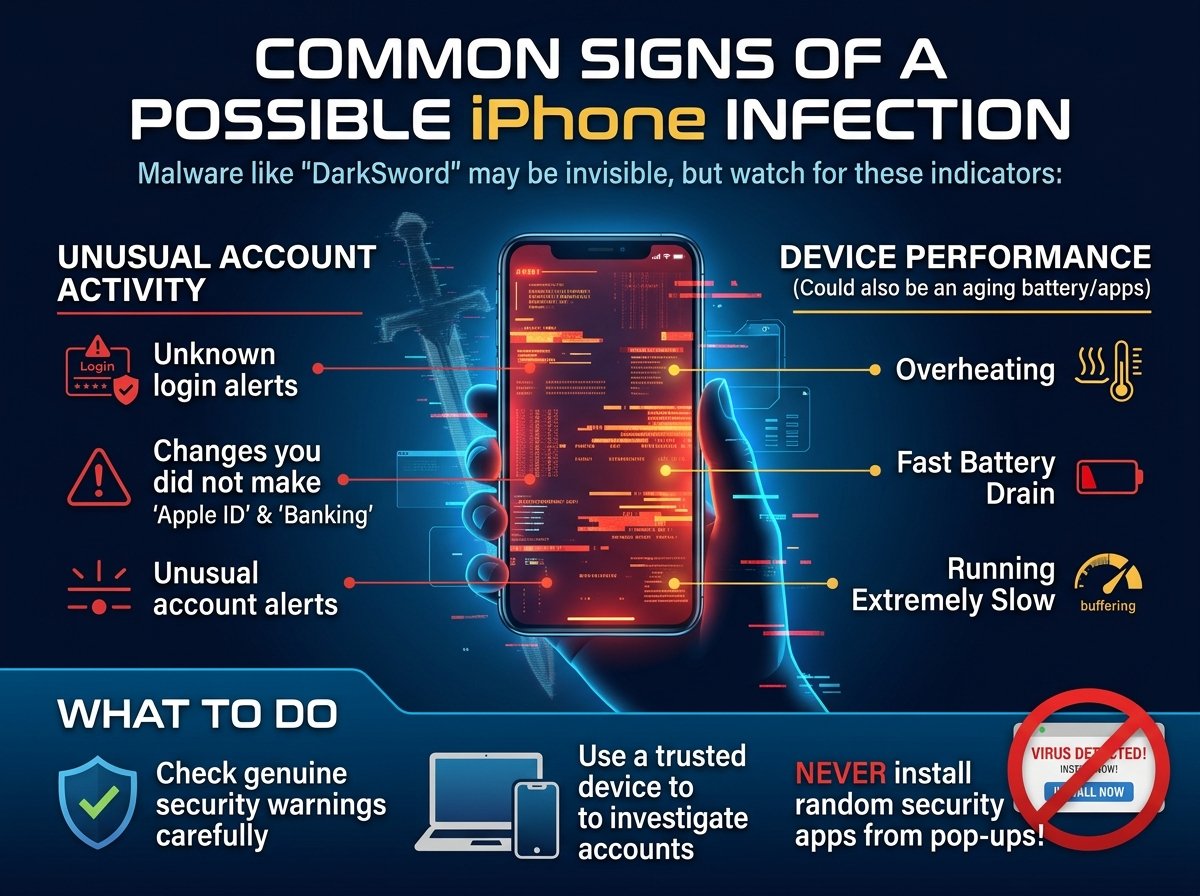
DarkSword may not show clear signs on an infected device. Therefore, you cannot rely on symptoms alone to confirm an attack.
For example, you may notice unusual account alerts, unknown login sessions or changes you did not make. These signs deserve attention, especially if they involve your Apple Account, email or banking services.
Your phone may also become hot, run slowly or lose battery power faster than usual. However, these problems often have simple causes, such as background apps or an ageing battery. They do not prove that DarkSword is present.
Instead, look for several signs and check any security warnings carefully. If a trusted security tool names a specific threat, record the exact message. Then use a trusted device to investigate your accounts. Never install a random security app just because a pop-up claims your iPhone is infected.
How to Handle DarkSword Malware Safely
Update Your iPhone to the Latest iOS Version
First, check whether your iPhone has the latest iOS version available for your model. Software updates fix security flaws and can help protect your device from known attacks.
To check for an update, open Settings and select General. Next, tap Software Update and follow the instructions on your screen. Install the available update and restart your phone if required.
Keep in mind that older iPhones may not support the newest iOS release. In that case, install the latest security update available for your device.
If your phone will not update, contact Apple Support or an authorised service provider. Do not rely on an outdated version if a security fix is available. Regular updates are one of the best ways to reduce the risk of malware attacks.
Protect Your Passwords and Online Accounts
Next, secure your important accounts if you suspect that someone has accessed your device. Use another trusted phone or computer for this task. This helps you avoid entering new passwords on a device that may be unsafe.
Start with your email and Apple Account. Then change passwords for banking, shopping and other important services if their details may have been exposed. Use a different, strong password for each account.
Also, turn on two-factor authentication where possible. Review recent sign-ins and remove sessions you do not recognise. If you notice an unknown payment, contact your bank at once.
If you use a cryptocurrency wallet, take extra care. Never share your recovery phrase or private keys with anyone who claims they can remove malware. Instead, contact the wallet provider through its official support service.
Clear Suspicious Safari Data
DarkSword attacks have been linked to harmful or compromised websites. Therefore, stop visiting any page you suspect may have caused the problem.
You can also clear Safari history and website data. Open Settings and find Safari, or the browser settings section on your iOS version. Then select the option to clear your browsing history and website data.
This step can remove saved website data and browsing records. However, it cannot fix an operating system flaw or guarantee that malware has gone.
For that reason, treat browser cleanup as an extra safety step. Always check for iOS updates as well. If you received a specific security alert, keep a record of it before clearing data.
Check Unknown Apps and Device Profiles
You should also review the apps on your iPhone. Remove apps you do not recognise only when you can confirm they are unwanted or unsafe.
Next, check whether your device has any unfamiliar management profiles. These profiles can control certain settings on an iPhone. You can review them in the General section of Settings, although menu names may vary.
However, do not remove a work or school profile without checking first. It may be required by your organisation.
Remember that deleting an app or profile does not prove that DarkSword has been removed. The threat can involve operating system flaws rather than a single app. Therefore, keep your software updated and seek expert help if you have strong evidence of an attack.
Should You Factory Reset Your iPhone?
A factory reset may help when you suspect a serious security problem. However, you should not reset your phone just because it runs slowly or loses battery power.
Before you begin, save important photos and files where safe to do so. If you suspect a serious compromise, ask a security expert how to protect your data first. A full backup may preserve settings or files you do not want to restore.
To reset your iPhone, open Settings and select General. Then choose Transfer or Reset iPhone and tap Erase All Content and Settings. Follow the steps shown on your screen.
After the reset, install the latest supported iOS version. Next, reinstall apps from the official App Store and review your account security. Avoid restoring suspicious apps or settings.
A reset is not a guaranteed fix for every advanced attack. Therefore, contact a qualified mobile security expert if you face a targeted threat or handle highly sensitive information.
How to Prevent Future DarkSword Attacks
Keep Your Software Up to Date
First, install security updates as soon as they become available. These updates can fix flaws that attackers may try to exploit.
Also, check whether your iPhone still receives security support. If your device no longer receives important updates, consider replacing it with a supported model.
Consider Apple’s Lockdown Mode
Apple’s Lockdown Mode adds extra protection for people who may face targeted cyberattacks. It limits some features that attackers could misuse.
For most users, regular updates and good account security are important first steps. However, if you believe someone is targeting you with advanced spyware, Lockdown Mode may offer extra protection.
You can find this feature under Privacy and Security in Settings on supported iPhones. Read the details before turning it on because some websites, messages and features may work differently.
Browse Safely and Secure Your Accounts
Be careful with links sent through unexpected emails, text messages and social media posts. A harmful website may pose a risk even when it does not ask you to download anything.
In addition, use strong passwords and turn on two-factor authentication. Check your account recovery details from time to time. Remove access for apps and services you no longer use.
These habits cannot stop every attack. Still, they can lower your risk and limit the damage if someone steals your login details.
Conclusion
Darksword malware removal begins with checking your iPhone’s security and installing the latest supported iOS updates. You should also protect your accounts, review suspicious activity and avoid unsafe websites.
However, battery drain and slow performance do not prove that your phone has malware. Check the facts before taking drastic steps. If you have strong evidence of an attack, consider a factory reset or seek help from a mobile security expert.
Most importantly, keep your device updated and use strong account protection. These steps can reduce security risks and help protect your personal data.
FAQs
What Is the Best Way to Handle DarkSword Malware?
Start by updating your iPhone to the latest supported iOS version. Next, secure your important accounts from another trusted device. If you find clear signs of an attack, seek expert advice before resetting your phone.
Can DarkSword Infect an iPhone Without an App Download?
Yes. Some DarkSword attacks can exploit flaws through a harmful website. Therefore, a user may face a risk without downloading a normal app. Keeping iOS updated helps protect against known security flaws.
Does Clearing Safari History Remove DarkSword Malware?
No. Clearing Safari history removes browsing records and some website data. However, it does not repair operating system flaws or guarantee that an infection is gone. You should also update iOS and check for signs of compromise.
Can a Factory Reset Remove DarkSword Malware?
A factory reset may help address some security problems. However, it is not a guaranteed solution for every advanced attack. Update your iPhone, protect your accounts and seek expert advice if you suspect a serious compromise.
How Can I Tell If My iPhone Has DarkSword Malware?
There is no single symptom that confirms DarkSword. Battery drain, overheating and slow performance can have many causes. Instead, check security alerts, review account activity and seek professional help if you find strong evidence of an attack.
How Can I Protect My iPhone From DarkSword?
Keep iOS updated and avoid suspicious websites. Also, use strong passwords and enable two-factor authentication. If you face a credible risk of targeted spyware, consider Apple’s Lockdown Mode and speak to a qualified security expert.
For more updates visit: RANKIVO