

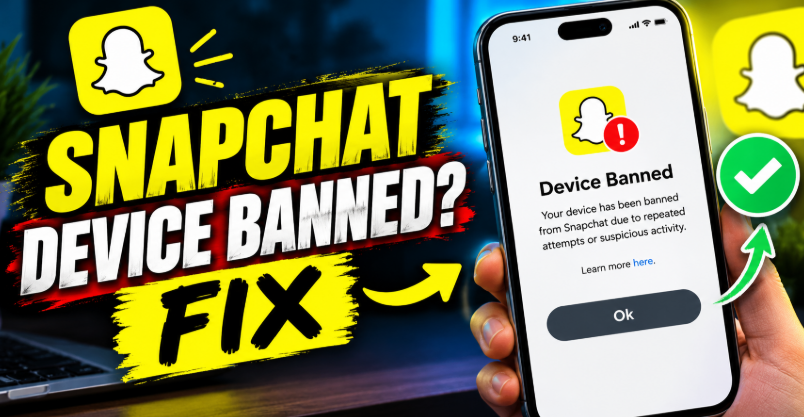

A Snapchat device ban can stop you from logging in, even when you enter the correct username and password. If you need a Snapchat device banned fix, the right solution depends on the error message, the reason for the restriction, and whether Snapchat has blocked your account, your device, or both. Repeated login attempts and unofficial unlocking tools can make troubleshooting more difficult.
The good news is that you can take several practical steps to understand the problem and pursue an official recovery. You should first identify the error, remove any unauthorised apps or modifications, and check Snapchat’s support options. However, no method can guarantee that a device ban will be removed. Some restrictions require an appeal, while others may remain in place.
What Does Snapchat Device Banned Mean?
A Snapchat device ban means the platform has restricted a particular phone or tablet from accessing its services. Unlike an ordinary account lock, this restriction can affect multiple accounts used on the same device.
Snapchat uses device restrictions to enforce its Community Guidelines and protect users against suspicious activity. The restriction may appear even when you enter the correct login details. Creating another account on the same phone usually will not solve the problem.
The exact message matters because a temporary login restriction, an account lock and a device ban require different responses. Therefore, identify your error code before attempting a fix.
How to Identify Your Snapchat Device Ban Error

SS06 or SS18: Device Banned
These error codes indicate that Snapchat has banned the device. The platform associates these restrictions with abuse, suspicious activity or repeated violations of its rules.
If you see SS06 or SS18, reinstalling Snapchat or resetting your password is unlikely to remove the restriction. You should check whether Snapchat offers an appeal through its in-app process.
SS07: Too Many Accounts Associated With Your Device
SS07 indicates that Snapchat has banned the device from logging in because too many accounts have been associated with it.
This can affect people who have switched between several accounts on one phone. However, the error does not automatically mean that every account involved has been permanently banned.
SS02: Too Many Login Attempts
SS02 is different from a permanent device ban. It indicates a temporary restriction following repeated unsuccessful login attempts.
Stop trying to sign in repeatedly. Check your login details and wait before trying again. Snapchat’s guidance recommends waiting a while for this restriction to clear.
SS04: Account Locked
SS04 indicates that the account you’re attempting to access is locked. It does not, by itself, confirm a device ban.
If the lock is temporary, you may be able to unlock your account through Snapchat’s official account portal. Follow the instructions displayed for your specific restriction.
Snapchat Device Banned Fix: Methods Worth Trying
Check Whether the Problem Affects Your Account or Device
Start by determining whether the restriction affects one account or the phone itself. If possible, sign in to your existing account on another device that you own or are authorised to use.
If the account works normally on the other device, the original phone may be the source of the problem. However, if Snapchat reports that the account itself is locked, you need to address that restriction separately.
Do not create multiple new accounts to test the problem. Repeated registration attempts can trigger further security restrictions.
Update Snapchat to the Latest Version
An outdated app can cause certain login and compatibility problems. Open the official app store for your device and check whether a Snapchat update is available.
Install the update, close the app completely and reopen it. Then try signing in once with your correct credentials.
Remember that updating Snapchat does not remove a confirmed SS06 or SS18 device ban. This step is useful for ruling out ordinary app problems rather than bypassing an enforcement decision.
Remove Unauthorised Snapchat Apps and Plugins
Modified Snapchat applications, unofficial plugins and third-party tools can put your account at risk. Some tools promise extra features, but using them may violate Snapchat’s rules.
Uninstall any unauthorised Snapchat modifications and return to the official application. If your account has a temporary lock related to third-party software, follow the waiting period shown in the restriction notice.
Once the permitted waiting period ends, try logging in through the official app. Removing these tools can help prevent further account problems, although it cannot guarantee that an existing device ban will disappear.
Restart Your Phone and Check Your Connection
A simple restart can help when the app freezes or fails to connect properly. Restart your phone, confirm that your internet connection works and open Snapchat again.
You can also switch between Wi-Fi and mobile data to investigate an ordinary connection problem. If the error changes or disappears, connectivity may have contributed to the issue.
However, changing networks will not remove a confirmed device ban. Avoid repeatedly switching networks in an attempt to bypass a security restriction.
Clear Snapchat’s Cache
Cached files can occasionally contribute to app performance issues. If Snapchat opens far enough to access its settings, you can try clearing its cache.
On Android, open Snapchat’s settings and look for the cache-clearing option. On an iPhone, use Snapchat’s own cache option if you can access the app.
Clearing the cache is not the same as deleting your account. Nevertheless, it will not reverse a device ban enforced by Snapchat’s systems.
Submit an Appeal If Snapchat Offers One
An in-app appeal is the most important recovery option when Snapchat makes your enforcement decision eligible for review.
Open Snapchat and attempt to log in. If a notification offers an Appeal Decision option, follow the instructions and explain why you believe the restriction is incorrect.
Keep your explanation factual. For example, if you purchased a second-hand phone and discovered the ban afterwards, explain that you are the new owner and did not control the device’s previous use.
Snapchat reviews eligible appeals individually. Its published guidance states that the review can take up to 30 days, so avoid submitting repeated requests in the hope of speeding up the process.
Contact Official Support for Guidance
If you cannot identify the restriction, review Snapchat’s official login troubleshooting guidance. This can help you distinguish a device ban from a temporary lock, a password problem or a connection error.
There is an important limitation, however. Snapchat states that its support team cannot directly unban a device in ordinary device-ban cases. If an enforcement action is eligible for appeal, the in-app appeal process is the legitimate route to challenge it.
Be cautious of anyone who promises guaranteed device unbanning in exchange for payment. Do not share your password, verification codes or account recovery details with unofficial services.
Can You Fix a Snapchat Device Ban on a Second-Hand Phone?
Yes, you can investigate the problem, but you may not be able to remove the restriction yourself. Snapchat acknowledges that a phone or tablet previously used by someone else can be affected by a device ban.
First, install the official Snapchat app and check that you have the latest version. If the device still displays SS06 or SS18, determine whether the message specifically identifies a device ban.
If you believe the restriction relates to the previous owner’s activity, explain the circumstances through any available official appeal process. Unfortunately, Snapchat generally does not make exceptions simply because a device was purchased second-hand.
Before buying a used phone, test its basic functions and check whether Snapchat can open and sign in normally. This precaution cannot guarantee that the device will remain unrestricted, but it can help you identify an existing problem before completing a purchase.
What You Should Avoid When Fixing a Snapchat Device Ban
Avoid unofficial tools that claim to remove Snapchat device restrictions instantly. Such services may request sensitive account information, install unsafe software or charge money without providing a legitimate solution.
A factory reset is also not a reliable fix for a confirmed device ban. It erases local information and settings, but it does not guarantee that Snapchat will remove its restriction.
Similarly, repeatedly creating accounts, reinstalling the app or changing your network will not reliably reverse an enforcement decision. These actions can waste time and may create additional account problems.
Instead, identify the error code, use the official application and follow the recovery options Snapchat actually provides.
How to Protect Your Snapchat Account in the Future
Once you regain access, use the official Snapchat application and keep it updated. Avoid modified apps, unofficial plugins and tools that automate activity on your account.
Use accurate login details and avoid repeated sign-in attempts when the platform reports a temporary restriction. Also, secure your account with a verified email address or phone number.
If you manage multiple accounts, avoid unnecessary account switching and follow Snapchat’s current rules. These precautions can reduce the risk of future restrictions, although no behaviour can guarantee that an account or device will never be flagged.
Conclusion
The best Snapchat device banned fix depends on the error displayed on your screen. SS06 and SS18 indicate a device ban, while SS07 relates to too many associated accounts. SS02 generally indicates a temporary login restriction, and SS04 identifies an account lock.
Start by checking the error code, updating the official app and ruling out ordinary connection problems. If Snapchat offers an in-app appeal, explain your situation clearly and wait for the decision.
Most importantly, understand that a confirmed device ban cannot reliably be removed through a cache clear, factory reset or unofficial unlocking tool. Follow Snapchat’s official recovery process and protect your account from further restrictions.
FAQs
Can I remove a Snapchat device ban?
You may be able to get a device ban removed if Snapchat grants an eligible appeal. However, Snapchat generally does not unban restricted devices in other circumstances. There is no guaranteed manual fix.
How long does a Snapchat device ban last?
Snapchat does not publish a universal expiry period for device bans. The duration and available recovery options depend on the restriction. Do not assume that waiting a fixed number of days will restore access.
Does SS06 mean my Snapchat account is permanently banned?
SS06 indicates that Snapchat has banned the device you’re using. It does not necessarily establish that every account associated with that device is permanently banned. Check your account’s status separately.
Does factory resetting a phone fix a Snapchat device ban?
A factory reset is not a reliable solution. Although it removes local data and settings, it does not guarantee that Snapchat will lift a device restriction. Try the official appeal process if one is available.
Can I use Snapchat on another phone if my device is banned?
You may be able to use your existing account on another device if the account itself remains in good standing. However, an account that has also been locked or permanently terminated may remain inaccessible. Follow the specific message Snapchat displays.
Can Snapchat Support unban my device?
Snapchat states that its support team cannot directly unban a device in ordinary device-ban cases. If the enforcement decision is eligible for an appeal, submit it through the in-app process. Avoid third-party services promising guaranteed results.
For more updates visit: RANKIVO